DudeCipote's SkillTree
A downloadable tool
Actor Skill Tree — RPG Maker MZ Plugin & Visual Editor
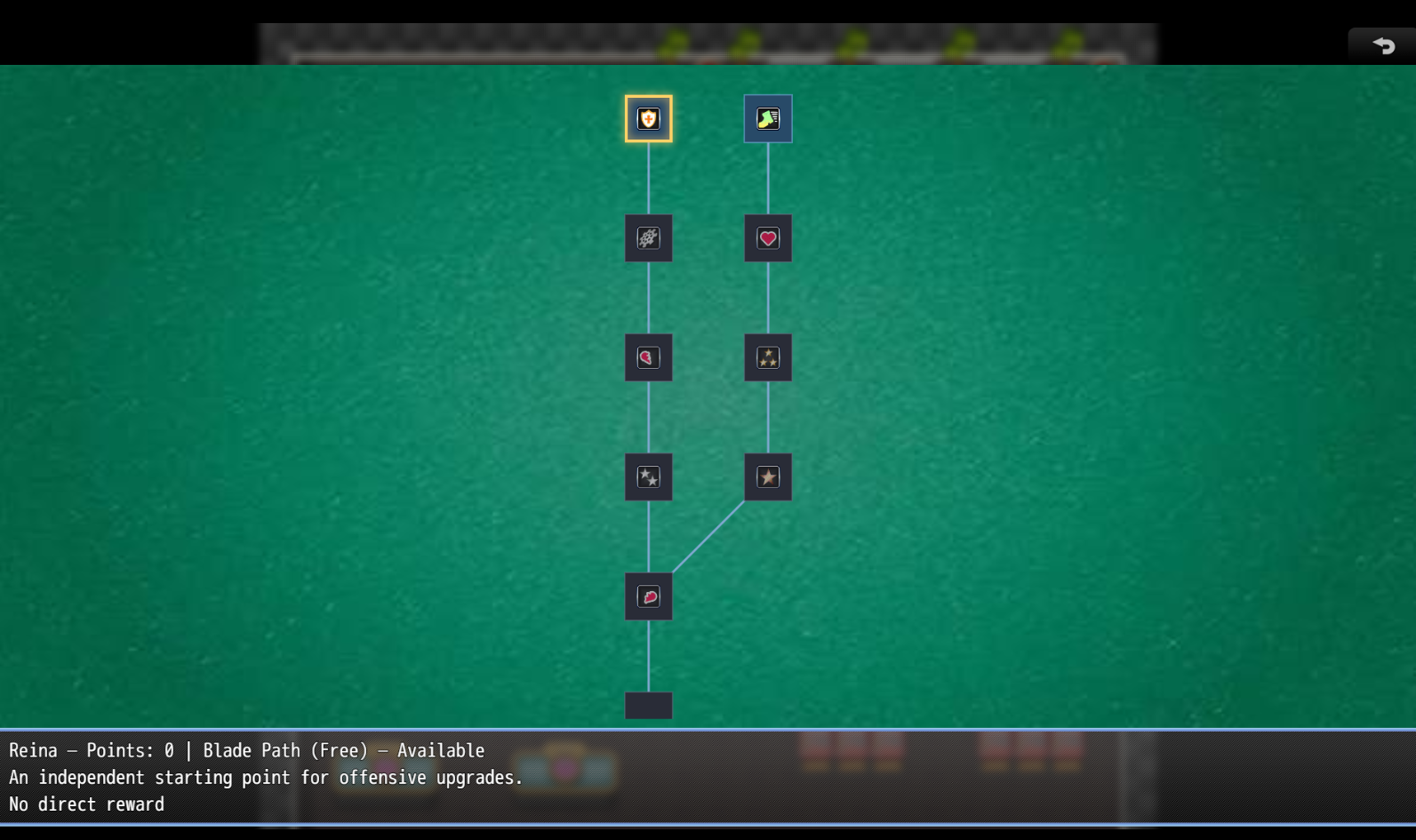
Actor Skill Tree adds a separate, persistent skill tree for each configured actor in RPG Maker MZ. Players open a Skill Tree command from the main menu, choose an eligible party member, and unlock nodes using tree points, gold, and any prerequisites you define.
A node can teach a skill, increase built-in stats, grant items or gold, change switches and variables, provide a bonus for another plugin to use, or simply connect one part of a tree to another.
The download also includes a standalone visual Skill Tree Editor. Use it to arrange nodes, draw connections, choose icons, configure rewards, and export the JSON needed by the plugin. The editor runs in a browser; it is not installed as an RPG Maker plugin.
About this project
Actor Skill Tree was made entirely with AI assistance. That’s why I’m offering it for free. This is my first time making plugins and publishing on itch.io, and I hope to keep improving it if people find it useful.
Recommendations, feedback, bug reports, and feature requests are welcome. If you find the plugin useful, please consider making an optional donation to support future improvements. You do not need to donate to use it.
Install the plugin
- Copy
ActorSkillTree.jsinto your RPG Maker MZ project'sjs/plugins/folder. - Open Tools → Plugin Manager, add ActorSkillTree, and enable it.
- Create a tree using the included visual editor, or import an existing tree JSON document.
- Paste the complete exported document into the plugin's Actor Trees JSON parameter.
- Save your project and restart your playtest to see changes to the tree definition.
The JSON file itself is an authoring file: the game does not read it automatically. The plugin uses the JSON pasted into Plugin Manager.
Use the Skill Tree Editor
- Extract the editor ZIP, keeping
index.html,editor.js, andeditor.csstogether. Openeditor/index.htmldirectly in a browser. No local server or extra installation is required. - Click Choose game folder and select the root of your RPG Maker MZ project—the folder containing
game.rmmzproject, not thedata/folder. This lets the editor display database names and preview icons fromimg/system/IconSet.png. The editor does not write to your game folder. - Click Open JSON file to import an existing tree, or Paste JSON to import the current Actor Trees JSON value from Plugin Manager. To start from scratch, click Add actor tree and enter an actor's database ID.
- Select an actor and click Add node. Edit the node's name, icon, description, costs, requirements, and rewards in Node details. Drag nodes to position them. To create a prerequisite, drag from a connection dot on the required node to the node that depends on it. You can also edit prerequisites in the node details panel.
- Resolve any validation errors displayed by the editor. When the document is valid, click Copy JSON or Download JSON. Paste the entire exported document into ActorSkillTree → Actor Trees JSON in Plugin Manager, then save the project.
The editor can help you select database skills, items, armour, weapons, switches, and variables by name or ID. If folder selection is unavailable in your browser, use Load database JSON files and Choose IconSet PNG to load previews manually. You can still edit and export a tree without those previews.
Editor layout tip: Grid snapping is on by default when adding or dragging nodes. Use the grid button to switch to free placement, or Snap all nodes to grid to align the selected actor's whole tree. This editor grid is separate from the plugin's Tree Layout setting, which controls how nodes appear in-game. The editor's icon selection stores icon indexes in JSON; it does not replace your game's IconSet image.
Export validation checks the tree's structure and connections, including invalid or circular prerequisites. It does not guarantee that every referenced database record exists in your game or that an inventory reward will fit in a particular save. Playtest your finished tree.
Plugin Manager settings
| Setting | What it does |
|---|---|
| Actor Trees JSON | code class="">version: 1 document containing every configured actor tree. |
| Menu Label | Changes the name of the main-menu command. Defaults to Skill Tree. |
| Tree Layout | Free uses saved x/y positions. Grid displays nodes in evenly spaced cells near those positions without changing the JSON.
|
| Grid Spacing | Distance between cells in the in-game Grid layout, from 80–1000 pixels. Defaults to 160; has no effect in Free layout. |
| Starting Node Horizontal | Chooses a leftmost or rightmost starting node and opening alignment. Center centers the view between the leftmost and rightmost displayed nodes. |
| Starting Node Vertical | Favors a topmost or bottommost starting node and opening alignment, or uses the middle position. |
| Tree Background Image | Optional PNG from img/ behind the tree board. Leave blank for the normal background.
|
| Background Image Path | Optional path relative to img/, including the extension, for an image in a subfolder or a JPG—for example, Background/Tree.jpg. Overrides Tree Background Image.
|
The background image fills the board and stays stationary as the nodes pan. Help and confirmation windows keep their usual backgrounds.
A starting node has no tree-node prerequisites. If several exist, the alignment settings choose the initial selection. Horizontal Left/Right takes priority over a vertical edge choice. Center + Middle selects the first starting node in the JSON; if none qualify, the first authored node is used.
What players see and do
The Skill Tree menu command appears when at least one current party member has a configured tree with usable nodes. After opening it, the player selects an eligible actor.
The tree screen shows icon-based nodes and their prerequisite connections, distinct locked/available/unlocked appearances, the actor's point balance, and details of the selected node. Every unlock asks for Yes/No confirmation, including free path nodes; No is selected initially. Canceling spends nothing. A node can only be unlocked once.
Players can select nodes with arrow keys or click/tap them. They can pan by dragging the board, using a mouse wheel or trackpad, or pressing Page Up/Down. Shift + wheel or Shift + Page Up/Down pans horizontally. Selecting a node brings it into view.
Defining a tree
The editor handles the JSON for you, but you can also write it manually. Actor Trees JSON expects one complete document
Node requirements
Place these inside a node's requires object:
treeNode: An array of prerequisite node IDs, not Skills database IDs. Every listed node must already be unlocked.cost: Nonnegative whole-number price in that actor's tree points; defaults to0.goldCost: Nonnegative whole-number price in party gold; defaults to0.switchId: One game-switch ID or an array of IDs. All listed switches must be ON. Checking them does not turn them off.switchText: Optional custom lock message displayed while a required switch is OFF.
A node may require points and gold together. Avoid prerequisite cycles, which prevent normal progression.
Node rewards
A node's optional rewards object can combine any of these:
| Reward | Example | Effect |
|---|---|---|
| Skill | "skillId": 4
| Teaches a Skills database skill. The actor must also be able to use its skill type. |
| Built-in parameters | "params": { "mhp": 25, "atk": 2 }
| Adds to built-in stats. Supported keys: mhp, mmp, atk, def, mat, mdf, agi, luk.
|
| Custom-stat bonuses | "customStats": { "reputation": 10 }
| Provides a bonus that another system can read and apply; it does not create a custom-stat mechanic by itself. |
| Items | "items": [{ "id": 7, "amount": 2 }]
| Gives items to party inventory once. |
| Armour | "armors": [{ "id": 1, "amount": 1 }]
| Gives armour to party inventory, not directly to an equipment slot. |
| Weapons | "weapons": [{ "id": 1, "amount": 1 }]
| Gives weapons to party inventory, not directly to an equipment slot. |
| Gold | "gold": 25
| Gives party gold. Any goldCost is paid first.
|
| Switches | "switches": [{ "id": 7, "value": true }]
| Turns ordinary game switches ON or OFF. |
| Variables | "variables": [{ "id": 1, "operation": "add", "value": 5 }]
| Uses set, add, or subtract on an ordinary game variable.
|
Built-in stat bonuses can be negative, but Max HP/MP bonuses do not refill current HP/MP. The params reward does not cover derived values such as Hit Rate, Evasion, TP, or Experience.
Inventory rewards need valid, named database records, and the full quantity must fit in party inventory before purchase. Reward lists cannot repeat the same ID within a list. A node with no rewards can still serve as a branching or connecting path.
Giving actors tree points
Points are not awarded automatically. In an RPG Maker event, add Plugin Command → ActorSkillTree → Give Tree Points, then choose an actor and a positive amount. For example, a quest-completion event could give an actor two points.
Points belong to individual actors, not the party or a game variable. Scripted event logic can also use:
js
$gameActors.actor(1).actorSkillTreePoints()$gameActors.actor(1).actorSkillTreeHasNode("beginning")$gameActors.actor(1).actorSkillTreeAddPoints(2)$gameActors.actor(1).actorSkillTreeCustomStatBonus("reputation")
The last expression returns a bonus, not a complete custom stat. Another system must include that bonus in its calculations.
Saves, compatibility, and limits
- Point balances and unlocked node IDs are saved on each actor. Preserve actor IDs and node IDs when updating a published game's trees so existing unlocks still match.
- Stat bonuses are calculated from saved unlocks and the current tree definition; loading a save does not grant them twice. Skills, inventory, gold, switch, and variable rewards happen at unlock time and are not granted retroactively if you change a node later.
- There is no automatic point income, respec/refund feature, or automatic integration with custom-stat systems.
- Invalid tree entries can produce warnings in the playtest's F8 console. The editor helps catch structural mistakes before export, but you should still playtest in your game.
- Older tree data formats are accepted for compatibility. For new trees, use the editor's exported format or the nested format shown above.
Terms of Use
You may use and modify Actor Skill Tree and its Editor for personal or commercial RPG Maker MZ games. Credit is appreciated but not required.
You may include the plugin with a game you distribute. Please do not redistribute, sell, or upload the plugin or editor as a standalone file or tool pack, including modified versions. You may share the tree JSON you create for your own game.
The plugin and editor are provided as is, without a guarantee of compatibility with other plugins, browsers, or future RPG Maker updates.
Feedback and donations
If something does not work, please leave a comment with your RPG Maker MZ version, what you were doing, and any errors shown in the playtest's F8 console. Suggestions and feature requests are welcome too.
The plugin and editor are free to use. Donations are entirely optional, but greatly appreciated if you'd like to support future improvements.
Download